Object Measurements And Tables
Measurement workflows turn labels, Boolean masks or mesh objects into tables.
Inspect and export the complete table
Select a calculated measurement node and expand Results. The compact table provides a quick preview; Open in window opens every row in a resizable result-table window. Click column headings to sort and inspect outliers, units, missing values, and per-object status/error fields.
Sorting is display-only. Export CSV/TSV… writes the exact scientific table in workflow row order, not the sorted presentation order. If upstream data or parameters changed, recalculate the stale manual result before exporting it. The result window shows the stale/current state rather than silently treating an old table as a new calculation.
Increase Decimal and Decrease Decimal controls in the result window let you show more or fewer decimal places without changing exported measurements. Hover over a cell to see its original value. See Decimal places in table views for defaults, limits and display-only behavior.
Reproducible intensity histograms
Intensity Histogram produces a full-data table from one connected numeric
array. Choose bin count, data-derived or custom bounds, and linear or logarithmic
bin spacing. These are scientific settings saved with the workflow, unlike a
display-only inspector histogram. The node is manual/cached by default.
Its table contains bin edges, centres, widths, counts, fractions, densities, and cumulative values. Non-finite values are excluded; custom-range underflow and overflow and values excluded from logarithmic bins are recorded in metadata. Review those counts instead of assuming every pixel fell inside the plot.
The inspector and histogram pop-out use the calculated table without rereading the source to redraw it. Switching between count, fraction, density, or cumulative views changes presentation, not the bin calculation. Use Results to inspect or export the exact values. A comparison between different images still needs an explicit shared range, common bin edges, and a justified normalization.
New in 0.16.0a3
Open histogram… on the Intensity Histogram graph card opens the existing detailed window from its cached result without changing selection or calculating. A result with binned values is required; stale results keep their warning so you can recalculate before use.
Improved in 0.15.0a4
In the detailed histogram window, overlapping channels use faint fills with a stepped outline for each channel. All outlines sit above the fills, making both distributions easier to follow. PNG/TIFF exports use the same style. Single-channel plots keep their bars. This does not smooth or change the bin values; zero-count bins still leave gaps on a logarithmic y axis.
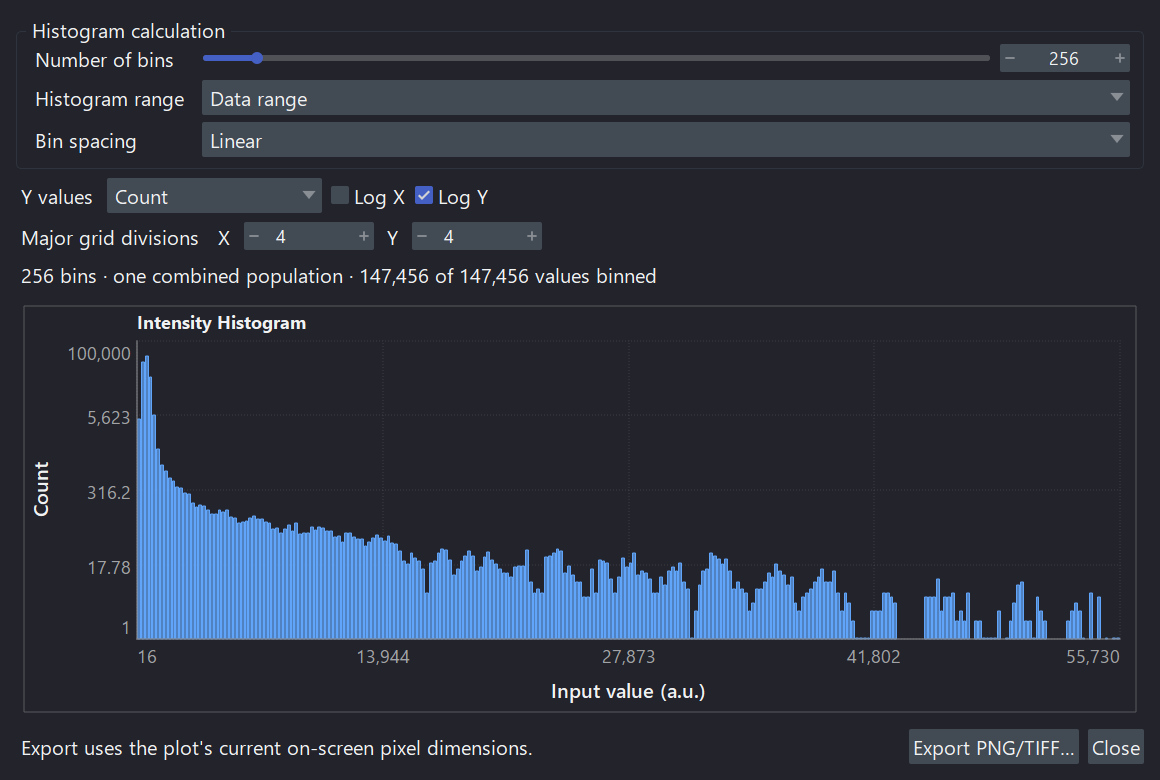
The histogram is a view of the cached scientific table. Retain its bin edges and excluded-value metadata when reporting the distribution.
Basic Object Measurement
Measure Objects reports object identity, size, centroid, bounding box,
equivalent diameter, extent, Euler number, and optional morphology groups. When
spatial scale metadata exists, physical-unit columns are emitted where the
calculation is well-defined.
Object Plus Intensity
This produces object morphology plus per-label intensity summaries such as mean, minimum, maximum, sum, and standard deviation.
Use this when you want measurements such as:
- intensity per nucleus;
- reporter intensity per cell;
- channel intensity inside segmented objects;
- object features for PCA or treatment separation.
CPU and GPU measurement coverage
In 0.15.0a2, the CuPy candidates for label-table measurements cover only the
basic Measure Objects and Measure Objects + Intensity schemas. They require native-endian,
non-negative int32 labels in resolved 2D/3D leading blocks. The intensity
variant additionally accepts matching Boolean, uint8, uint16, or finite
float32 intensity data.
Enabling shape/axis/boundary descriptors, derived ratios, 2D moments, or other extended groups keeps the complete node on the authoritative CPU path. This is expected and appears in the node decision; the GPU provider never returns a reduced table while pretending the requested schema was complete. Its bounded device calculation is finished by an exact typed host-table finalizer that preserves schema, row/column order, units, integer fields, and missing-value semantics. A one-pixel object's population standard deviation is exactly zero.
The standard gpu-cuda13 extra includes these CuPy providers. No separate
provider build or installation is required. See the
Windows NVIDIA GPU guide and
choose and verify compute.
Since 0.15.0a1, VIPP also provides a hybrid GPU path for Measure 3D Mesh
Morphology on supported non-negative native int32 3D labels. The GPU packs
label regions; marching cubes, convex hulls, and exact public table construction
remain authoritative CPU work. A GPU badge therefore does not mean every part
of a mesh calculation ran on the device or that it must be faster.
Analyze Skeleton has a reviewed CuPyX path for Boolean, already-skeletonized 2D/3D inputs. Requesting skeletonization first remains CPU work. Both providers retain dtype, shape, environment, memory, and scientific admission gates. See the compute matrix for scope.
3D Mesh Morphology
Use this for true ZYX labels when surface area, mesh volume, sphericity,
convex hull metrics, or 3D solidity matter.
This node is manual/cached because mesh calculations can be expensive.
You can also connect a Boolean mask or an existing Mesh.
- Mask: all foreground is one object. Use Label Connected Components first when you need a separate row per object.
- Mesh: measures the supplied triangles directly, with one row per
explicit mesh object and its stable
mesh_id. Disconnected parts with the same ID stay in that row. Spatial mode and Minimum voxel count do not apply. Calibration is retained and compatible units convert to the X-axis unit; voxel counts and voxel volume are not inferred.
Open, degenerate, non-manifold or inconsistently wound surfaces have NaN
volume-derived fields and an explanation in mesh_status/mesh_error.
Area and extents remain available. These checks do not detect every possible
self-intersection or certify a mesh for printing.
Use 3D Meshes to create surfaces, retain label IDs, assign colours, combine, split, filter or refine objects, and export 3MF/OBJ. Mesh measurements use the current triangles, including any smoothing or simplification, without extracting a new surface. The cached-mesh path stays on CPU with Auto or Prefer GPU as well.
Keep mesh_id when exporting tables. Filtering and refinement retain IDs;
combining can remap duplicate IDs, and splitting creates additional IDs.
Recalculate measurements after those operations instead of joining an older
table by row position. Original/parent identities remain in mesh metadata.
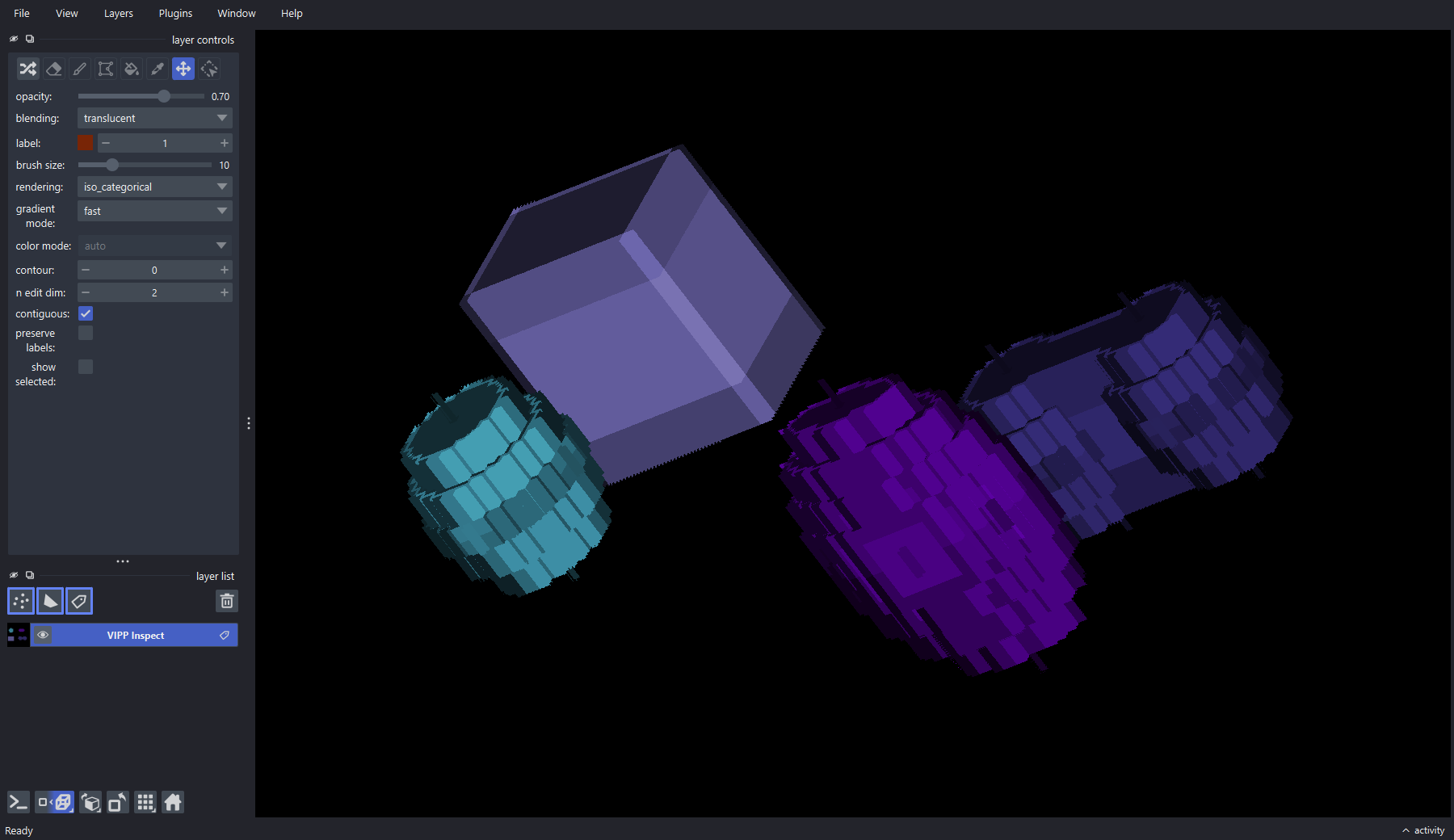
Inspect the 3D label geometry as well as the resulting table. The bundled phantom includes varied shapes and anisotropic calibration for regression and demonstration—not biological validation.
Table Assembly
Manual/cached sibling measurements can be calculated in either order. Since 0.14.0a1, re-reading or re-materializing the same unchanged file revision does not stale a ready sibling merely because Python created a different array wrapper. For example:
Calculate both manual nodes. Each should remain ready, and Merge Tables should become calculable once it has both coherent tables. This also applies when low-memory cache pruning re-materializes the same pinned source revision.
A genuine edit still invalidates the appropriate descendants. Recheck both branches after changing the source file/revision, labels, intensity input, parameters, or connections. If siblings alternate between ready and stale without any such change, preserve the workflow and execution details and report the problem; repeatedly recalculating is not a valid workaround for an incoherent merge.
flowchart LR
  L["Labels"] --> M["Measure Objects"]
  L --> I["Measure Objects + Intensity"]
  X["Matching intensity image"] --> I
  L --> D["Measure 3D Mesh Morphology"]
  M --> J["Merge Tables"]
  I --> J
  D --> J
  J --> S["Select Table Columns"]
  S --> A["Add Metadata Columns"]
  A --> U["Summarize or Batch Output"]
Only merge branches that share compatible identity keys and meaning. A table with the expected row count can still be wrong if time, label, or source identity columns were dropped or misaligned.
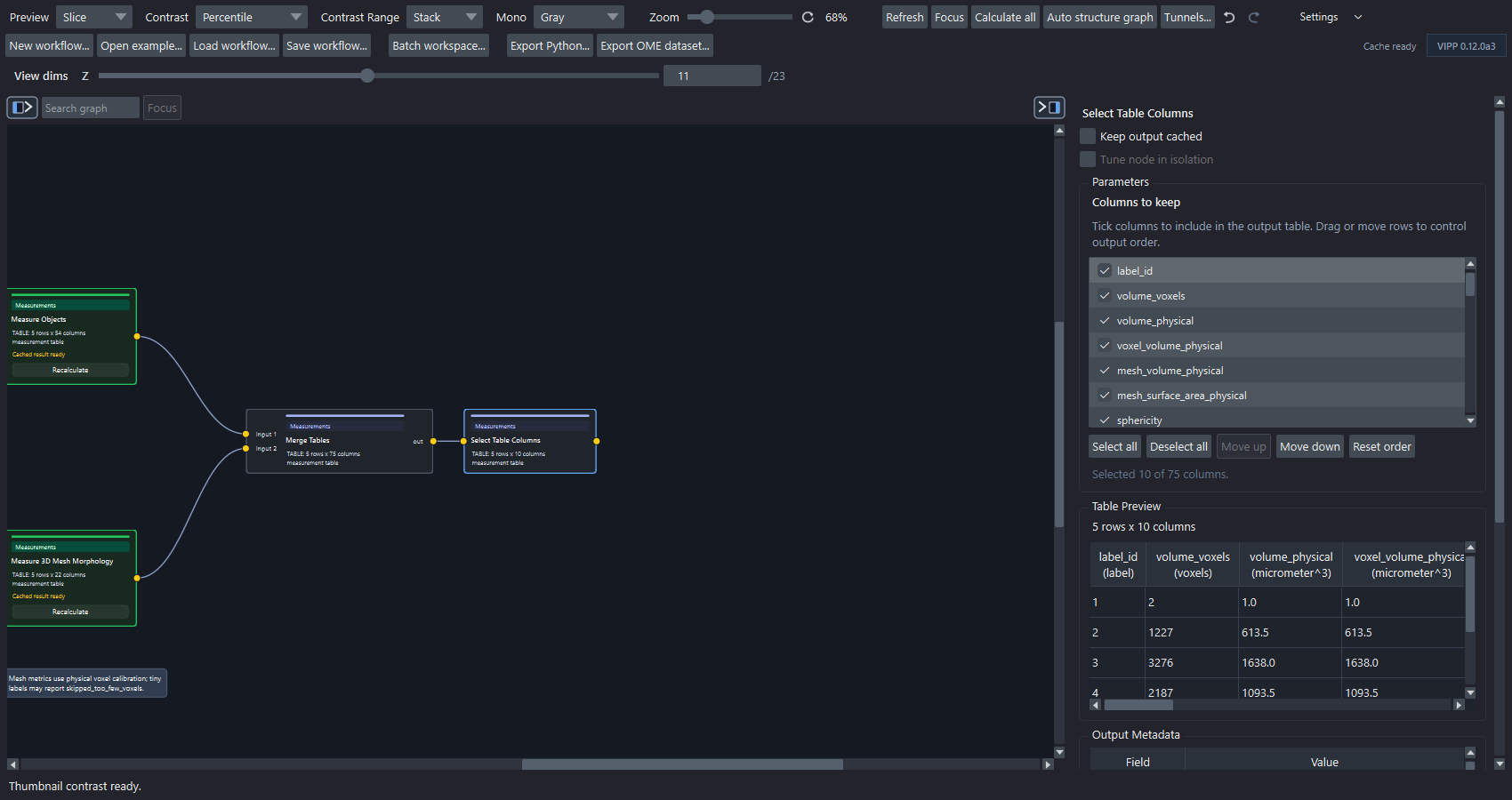
The bundled mesh example combines calibrated object and mesh measurements, then selects a compact table whose rows, columns, units, and values can be reviewed before export.
Reference Workflows
To build tables, summaries and figures interactively in one window, use Results Workspace (new in 0.16.0a1). Its controls edit the ordinary workflow nodes; existing inspectors and table/plot windows remain available.
For descriptive counts, mean/median, spread or range, see Summarize measurements (new in 0.16.0a1). Choose objects, image means or declared-sample means explicitly; no inferential tests or confidence intervals are added.
For figures from one image or a collected table, see Plot measurement results (new in 0.16.0a1). The Morphology & Intensity Plots example measures 60 synthetic objects and compares four plot types without a batch run.
For results from several images, use Collect measurements from a batch (new in 0.16.0a1). It appends compatible saved observations into one dataset while preserving image identity; Merge Tables above joins fields describing matching observations within the analysis.
| Workflow | Purpose |
|---|---|
red-channel-object-intensity-measurements.json |
Labels plus matching intensity image into Measure Objects + Intensity. |
red-channel-merged-measurement-table.json |
Object morphology, intensity, table merge, and metadata columns. |
synthetic-measurement-summary.json |
Grouped summaries with known object counts and areas. 0.16.0a1 uses the new descriptive recipe, including undefined singleton sample SD. |
synthetic-derived-object-morphology.json |
Derived 2D morphology, circularity, and Hu moments. |
synthetic-measurement-plots.json |
New in 0.16.0a1: calibrated shape/intensity measurements from 60 objects, followed by histogram, scatter, individual-point and cumulative plots. |
synthetic-3d-mesh-morphology.json |
True-3D mesh morphology on anisotropic synthetic objects. |
synthetic-mesh-objects.json |
Saved sample-specific colouring, filtering, combining and refinement choices, followed by current-mesh measurements. 0.15.0a3 keeps this as the single mesh-object example. |
What To Check Before Export
Use measurement tables and units for identity keys, unit propagation, physical-column limits, and mesh-status fields.
- Are labels correct?
- Are label IDs stable after filtering?
- Are scale and units correct?
- Are leading axes such as time represented by identity columns?
- Do table units match the reported measurement?
- Have metadata columns such as treatment, replicate, or batch been added?