Tune without fooling yourself
Interactive tuning can reveal failures quickly. It can also overfit a workflow to attractive fields or leak information from the final analysis into method development.
Separate development from evaluation
Before tuning, divide representative data by biological unit—not merely by image tile—into:
- a development set used to choose graph structure and parameters;
- a held-out evaluation set used only after the workflow is frozen;
- optionally, a stress set containing known difficult acquisition or artifact conditions.
If multiple images come from one animal, culture, patient, or acquisition, keep related images in the same partition.
Tune in causal order
Work from upstream to downstream:
- Confirm source, axes, channel, and calibration.
- Tune background/denoising without erasing target structures.
- Tune threshold or model output against boundaries and missed objects.
- Tune morphology and object splitting against known failure types.
- Tune label filtering using biological and acquisition scale.
- Configure measurements only after labels are acceptable.
Changing several stages together makes it difficult to know which decision improved or damaged the result.
Isolate a fast parameter decision
Use Tune node in isolation when the selected operation is quick to evaluate but its downstream branch is expensive. The selected node must have a coherent cached result, and no dirty edit, pipeline calculation, source load, or batch run can be pending or in flight. Its descendants need not all have outputs.
During isolation, edits recalculate only the selected node and any missing upstream dependency. The tuned node is bright amber. Its downstream closure is darker amber and keeps each last coherent result that already exists. A descendant without a previous result remains unavailable. Existing waiting previews are useful as a reference, but they are not evidence for the new parameter choice.
After inspecting the local result:
- choose Apply and continue to keep the latest parameters and result, then resume calculation from the direct downstream nodes;
- choose Cancel tuning to restore the session-start parameters, output, and execution state without recalculating the held branch; or
- choose Calculate all to apply the result, leave isolation, and continue the graph under the normal automatic/manual-node policy.
Only one node can be isolated at a time. Undo/redo and edits to graph structure, layout, notes, or the loaded workflow first commit the current tuning result, so Cancel never restores across a different graph revision. Isolation is transient interactive state and is not serialized into workflow JSON; save the workflow after accepting the parameter decision.
Isolation changes when descendants run, not the calculation performed by the tuned node. Keep the same development/held-out separation and inspect failures across representative samples before freezing the workflow.
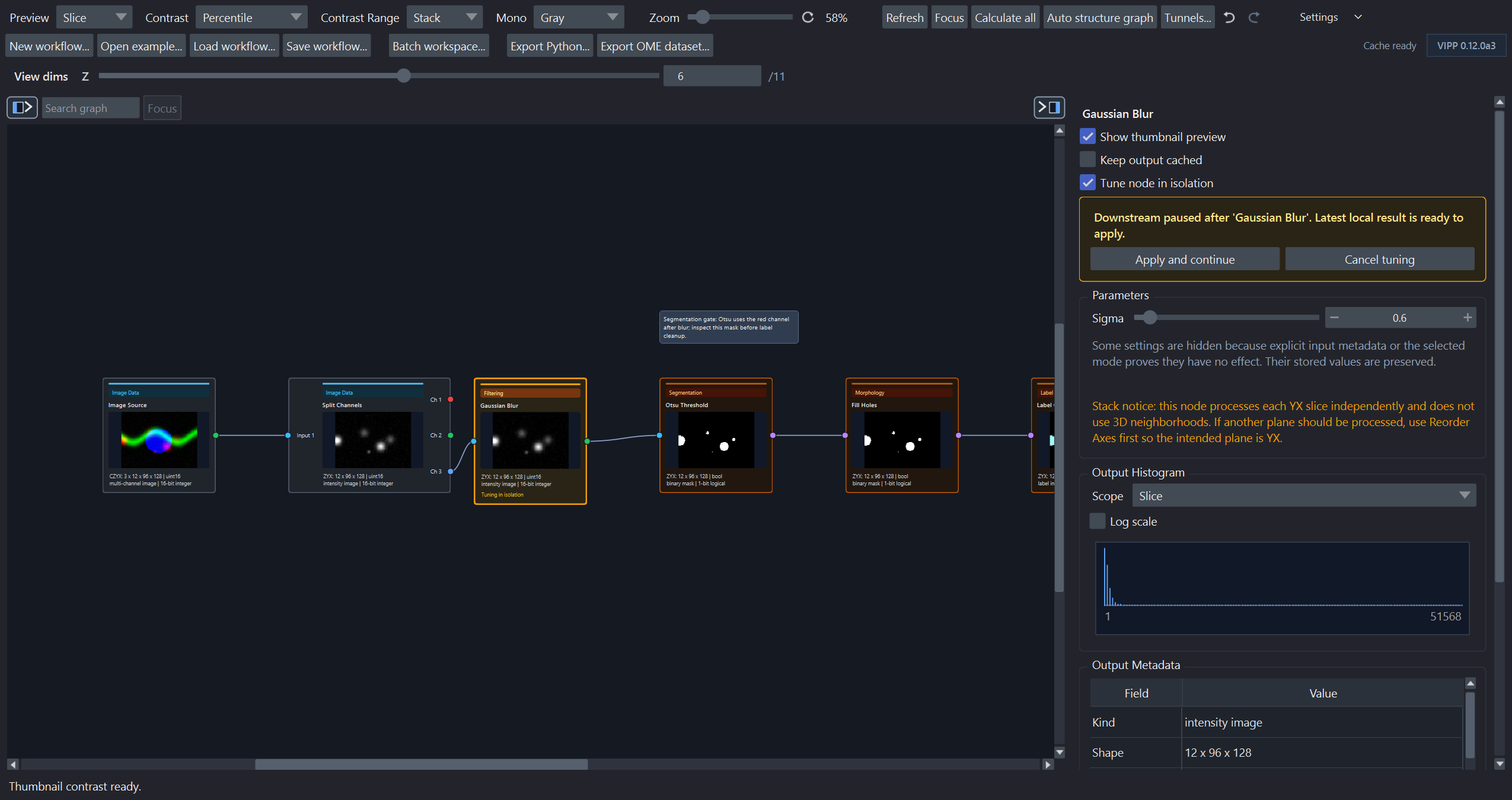
The selected node has a current local result. Apply resumes the darker-amber branch; Cancel restores the calculated session-start result.
Choose intensity cutoffs deliberately
Rescale Intensity and Clamp Intensity expose modes that look similar but make different
scientific promises.
| Node and mode | What VIPP does | When it is useful |
|---|---|---|
Rescale Intensity — Percentiles (exact) |
Calculates the requested percentiles from every finite input value, then maps those cutoffs to the output range. Values outside the cutoffs are clipped to the output limits. | Adapting to the distribution of each input while keeping the percentile rule fixed. |
Rescale Intensity — Explicit values |
Uses the saved low and high intensities directly; no percentile is estimated. | Applying common calibrated cutoffs to comparable acquisitions. |
Clamp Intensity — Full data range |
Preserves the complete input range; it does not infer hidden percentile cutoffs. | Keeping a no-clipping starting state while the node remains in the graph. |
Clamp Intensity — Explicit values |
Clamps intensities to the saved minimum and maximum. | Enforcing a justified measurement or acquisition range. |
Boolean masks pass through both nodes without changing their foreground and background decisions.
For integer images, VIPP calculates percentile order statistics on the native
integer values and retains fractional interpolation exactly. Rescaling is done
after subtracting an integer origin, so adjacent int64/uint64 levels do not
collapse merely because their absolute values are large. Integer Clamp Intensity accepts
whole-number bounds and clamps in the native dtype; convert to floating point
first if a fractional bound is intended.
An integer Rescale input or output interval wider than 2^53 levels reports an error because float64 ratio arithmetic cannot distinguish every level across that interval. The graphical numeric controls also cannot represent adjacent absolute integers above 2^53. Use percentile mode, an exact integer literal in a workflow/export, or an intentional dtype conversion for such unusual data.
Exact percentiles are recalculated for each connected input. This is reproducible as a rule, but it does not produce identical absolute cutoffs for images with different intensity distributions. Use Explicit values when the biological method requires the same absolute cutoffs across samples.
Example choices
Rescale Intensity, percentiles0.5and99.5, output0to1: an exact distribution-relative stretch that saturates the lowest and highest 0.5%.Rescale Intensity, values120and3,500, output0to1: the same absolute input window for every compatible image.Clamp Intensity, values0and4,095: explicit clipping to a justified 12-bit acquisition range stored in a wider integer container.
Record why the chosen rule is appropriate. Avoid changing between percentiles and values merely to make individual fields look similar.
Treat dtype conversion as a method decision
Some admitted GPU regions—most notably Gaussian blur and deconvolution—require
finite float32 and can be much faster there than the corresponding native
integer workflow. VIPP never inserts that conversion during compute planning or
optimization. Add Convert Dtype only when its preserve/rescale policy is
appropriate for the analysis, then recheck thresholds, rounding, output
formats, memory, and validation results. Record the conversion even when its
immediate motivation was performance.
Benchmark only after graph structure and scientific parameters are sensible on representative data. A node or pipeline benchmark compares implementations of the authored calculation; it must not become a reason to retune the calculation until the fastest result looks attractive.
Distinguish Auto Contrast From Layer Contrast
When Linear Scale + Offset is selected, Auto Contrast calculates exact
lower and upper percentiles from every finite input value. The saturation
percentage is split equally between the two tails: for example, 1% saturation
uses the 0.5th and 99.5th percentiles. Large inputs are calculated in the
background.
For RGB or RGBA input, VIPP derives one shared scale/offset pair from RGB luminance; an alpha channel does not influence the range.
Auto Contrast then writes alpha and beta into the node and changes the
processed output. It is therefore an analysis decision that must be saved,
validated, and reported where relevant.
By contrast, the contrast limits of a napari inspect or pinned layer affect only how that layer is drawn. They never change a node array, threshold, mask, or measurement. See Inspection and calculation for the provisional-to-exact display behavior used with large layers.
Avoid count chasing
Do not tune until the object count matches an expectation unless that expectation comes from independent ground truth. Inspect false positives, false negatives, merges, splits, boundaries, and failures across conditions.
Use predefined parameter ranges and stop rules when possible. Save graph checkpoints before major changes and record why the selected configuration was preferred.
Freeze before batch execution
Once the development set is satisfactory:
- save and checksum the workflow;
- record VIPP and dependency versions;
- lock input selection and exclusion rules;
- define outputs and batch naming;
- record the compute request, any optimizer locks/assignment, and the actual implementation provenance expected to be audited;
- evaluate without further tuning on the held-out set.
If evaluation prompts a change, describe that change and repeat evaluation on a genuinely independent set when claims depend on unbiased performance.