

See every decision in your analysis
Visual workflows for reproducible bioimage analysis.
Build bioimage-analysis workflows as connected graphs, inspect intermediate images and tables, then save the workflow for review, adaptation, or batch processing.
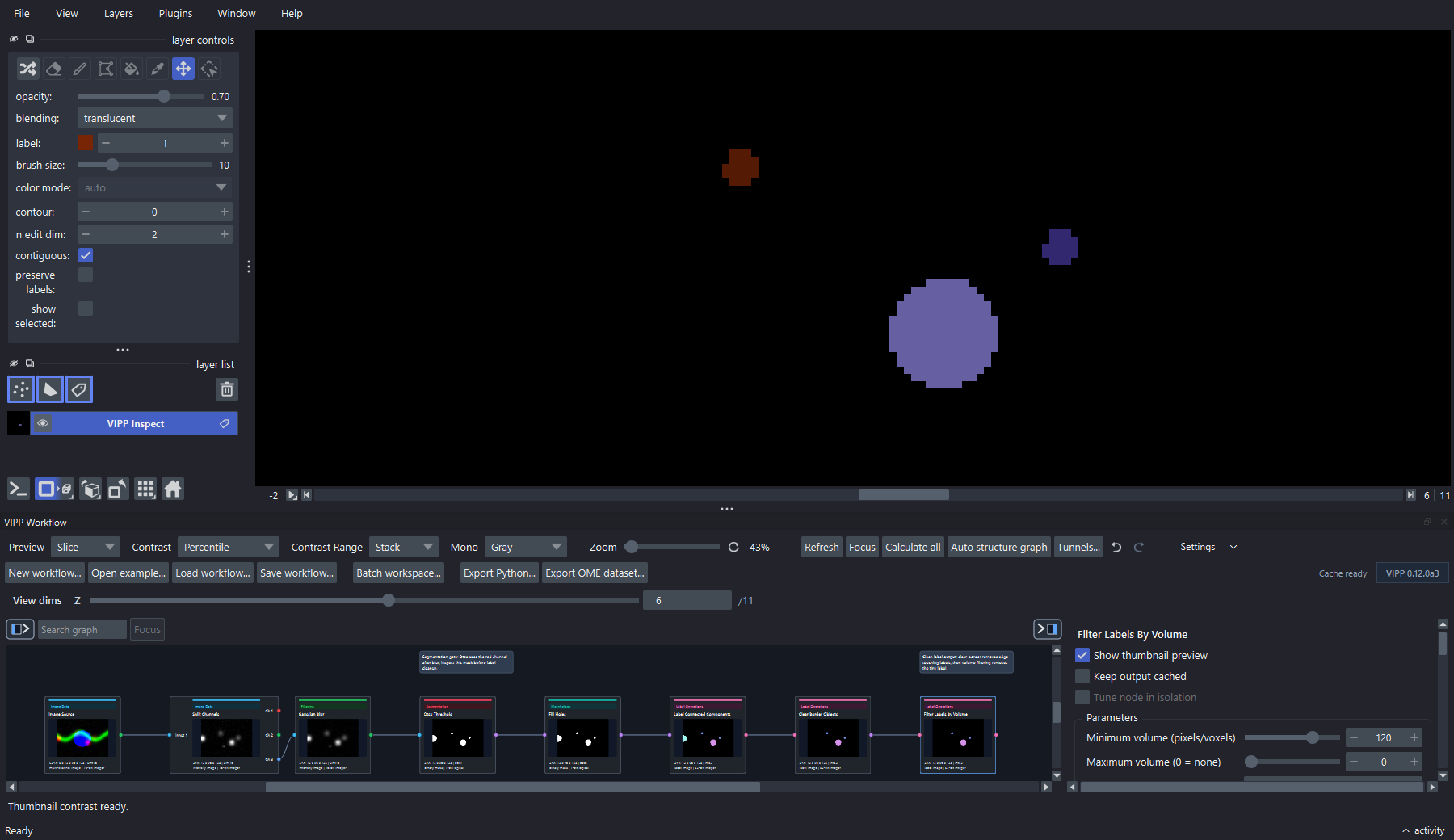
A complete label-cleanup graph shown in context. For day-to-day authoring, enlarge or undock VIPP so the graph remains the primary work surface.
Alpha release: validate before interpreting
This manual documents napari-vipp 0.13.0a6, distributed as an alpha pre-release through GitHub and PyPI. Windows users should begin with the explicitly unsigned, checksum-verified installer; Linux, macOS, blocked Windows computers, and advanced users can use the version-pinned pip route. Exact release-source, CI, signing status, and release-verification status are recorded in the release notes. The immutable commit, successful cross-platform CI run, explicit unsigned status, and qualified artifact hashes are recorded there. GitHub, PyPI, and the numbered manual are public and verified. Do not treat unperformed external fresh-machine or novice checks as passes. Interfaces, workflow files, and parameter defaults may change between alpha releases. Treat visual inspection, reference data, and domain review as part of the analysis—not as optional cleanup after it.
0.13 workflow and compute compatibility
0.13.0a6 writes workflow schema 4. A valid schema-3 workflow loads with an explicit CPU compute request, while schemas 1 and 2 remain rejected. Cached results are not saved in workflow JSON and generated Python is pinned to its creator version. Read the 0.13.0a6 release notes before upgrading and revalidate calculated results afterward.
Batch configs and manifests are version 3. Version-1 configs load with an explicit CPU request; version-2 configs keep their saved compute request. Both older versions have no source-axis declaration until reviewed and saved as version 3. For ordinary TIFF collections, review the Batch workspace's Image stack choice before treating generic pages as Z.
Choose your path
What VIPP records—and what it does not
VIPP workflow JSON records the graph, node parameters, connections, layout, and selected workflow state. Where available, image state carries axes, scale, units, channel information, and operation history through compatible nodes. This supports inspection and repeat execution, but it does not by itself guarantee scientific reproducibility: input identity, software environment, batch bindings, reference annotations, exclusions, and validation evidence must also be retained.
flowchart LR
  A["Load representative data"] --> B["Build and tune graph"]
  B --> C["Inspect intermediate outputs"]
  C --> D["Validate against references"]
  D --> E["Freeze workflow and environment"]
  E --> F["Run batch and audit outputs"]
Quick links
| Goal | Go to |
|---|---|
| Open a working example in five minutes | Tour a finished workflow |
| Switch from synthetic data to your images | Use your own images |
| Understand images, masks, labels, and tables | Data types |
| Diagnose a workflow that suddenly gives different counts | Common problems |
| Ask a question or report a reproducible problem | Support routes |
| Prepare methods and provenance for a paper | Report a VIPP analysis |
| Choose and verify CPU/GPU execution | CPU and GPU compute |
| Review everything changed in 0.13 | 0.13.0a6 release notes |
| Contribute a node or documentation fix | Contributor guide |
The application is developed in the
napari-vipp repository. This
site is the quick, searchable manual; slower teaching material can live in a
separate course or book.